Choose Watt Meters, Solar Extension Cables, and Regional Plug Adapters
Measure energy on the right electrical path and verify the ratings, connector, polarity, length, and regional limits of power station accessories.
A plug-in watt meter can show how much energy an appliance uses from an AC outlet. An extension cable can move equipment farther from a source, and a regional plug adapter can change the physical plug shape. A solar-panel extension cable is a separate DC accessory on the charging path. Each item solves a different problem; none automatically makes a station, panel, appliance, or supply compatible.
Use a meter for the question you have
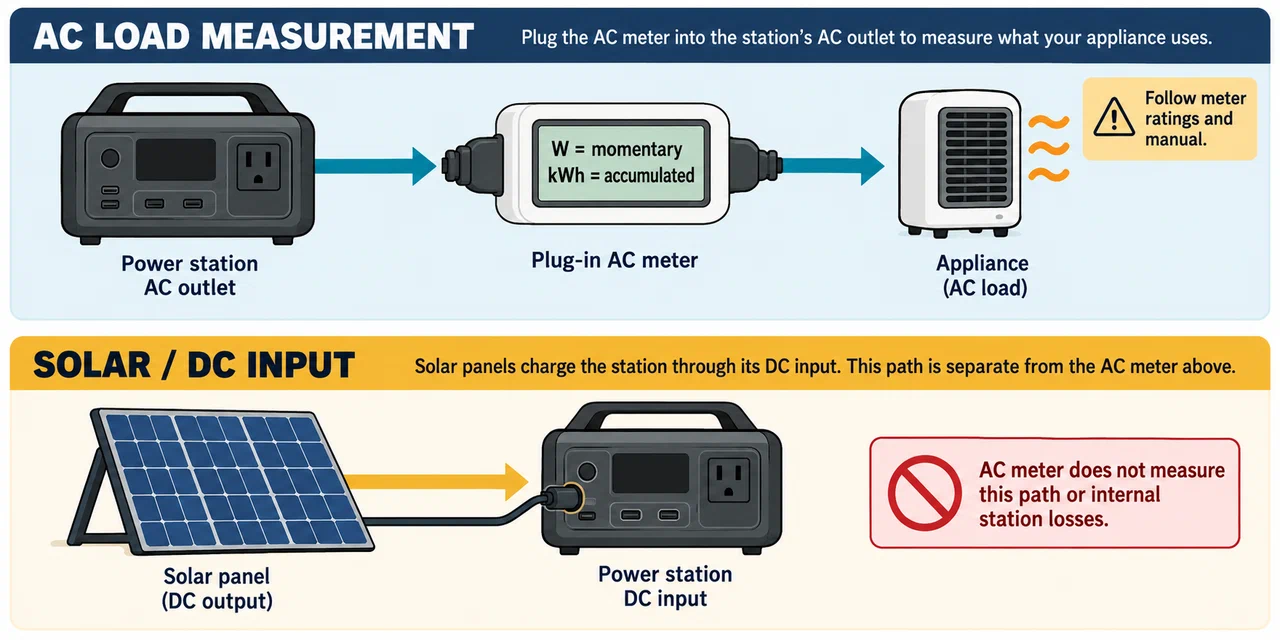
Choose a meter with a voltage, frequency, current, and plug rating suitable for the country and appliance. Follow its manual for permitted loads and setup. A meter that reports watts shows a momentary active-power reading; accumulated kilowatt-hours (kWh) over a representative interval are more useful for many energy estimates. Volt-amperes (VA) describe apparent power, and volts and amps are separate readings. Do not treat all four values as interchangeable.
The P3 Kill A Watt EZ P4400 is an example of a North American plug-in AC meter. Its manual describes voltage, current, watts, VA, and cumulative kWh functions. The US product information lists a 115 V AC rating, 15 A maximum, and 1,875 VA maximum. Those are ratings for that meter and regional version, not a universal rating for the P3 family or equipment sold elsewhere. Check the meter label and manual before connecting it.
To estimate an appliance’s ordinary energy use, meter it over its normal operating cycle, including on/off cycling. A brief reading may miss a refrigerator compressor cycle or a device’s changing workload. Use only the meter’s documented functions and ratings. Unless a meter explicitly specifies an appropriate transient or inrush function, do not rely on its steady reading to characterize startup behavior. Follow the appliance manual for startup and surge requirements.
Choose an AC extension cable by its full rating
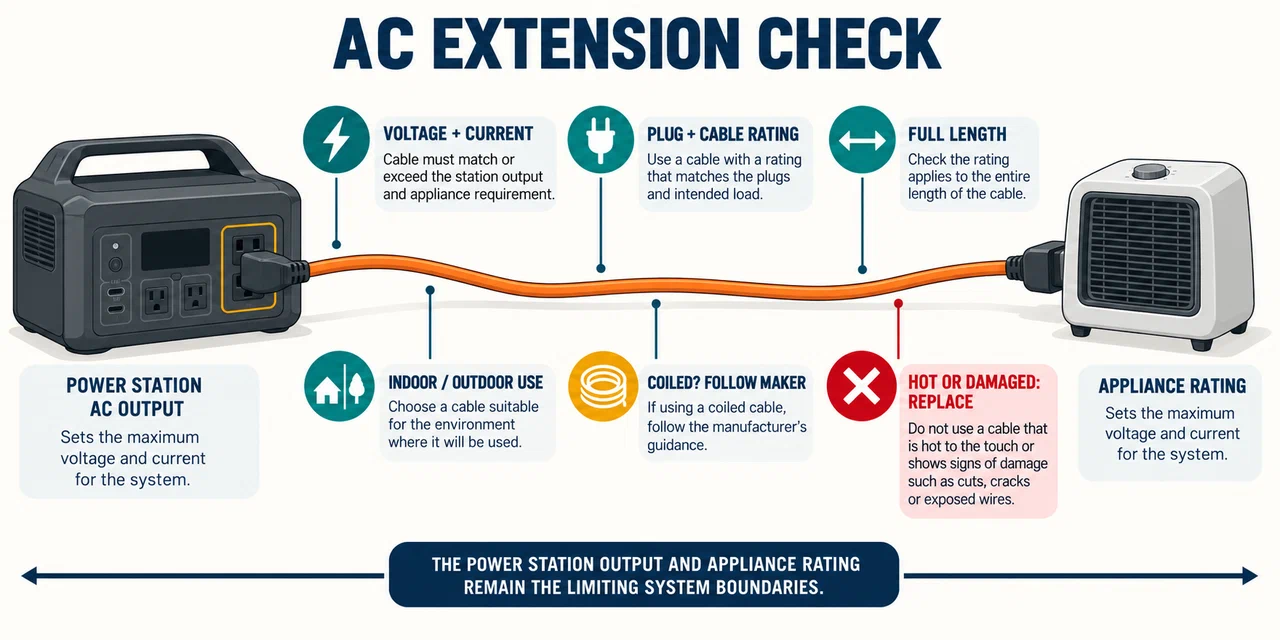
Use an AC extension cable intended for the appliance, current, voltage, environment, and length. Check its plug type, conductor and insulation markings, maximum rating, indoor or outdoor use, and whether the manufacturer permits use while coiled. Keep it away from water, heat, sharp edges, doors, and walkways, and inspect it before use. Replace a damaged or hot cable rather than taping or bypassing the defect.
The appliance’s demand and the power station’s output limits still apply through an extension. Do not add multiple extension leads or use a travel adapter as an extension unless the equipment makers specifically allow that setup. This guide does not specify wire gauge or fixed building wiring; follow the cable manufacturer’s rating and seek qualified help for permanent or household circuit work.
Select a solar DC extension for the exact charging path
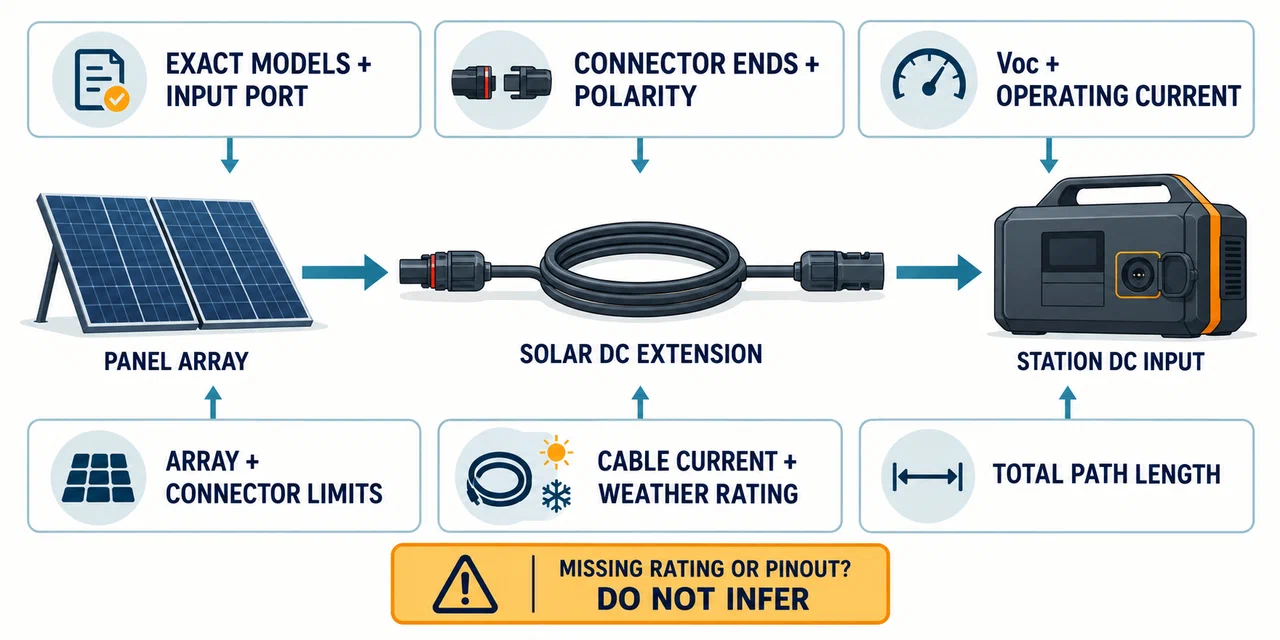
A solar extension sits between panels and a station’s DC input. Before choosing one, record the exact station and panel models, input port, connector ends, polarity, panel Voc and operating current, permitted arrangement, and total cable length. Check the station and panel manuals for a cable type, extension length, current rating, weather rating, and any limit on added connectors. Connector shape alone does not answer those questions.
A longer conductor path can increase resistance and voltage drop. The effect depends on current, the full path length, conductor material and cross-section, and cable construction. Use the cable maker’s specifications and the exact equipment instructions; do not treat a general battery-cable table as a solar-panel cable rating. If the cable’s rating, connector pinout, or polarity is missing, do not infer it from a photograph or from another cable with a similar plug.
Manufacturer examples show why the exact part matters:
- Jackery describes a 5 m SolarSaga extension with a female DC7909 connector at the panel end and a male DC7909–DC8020 end at the power source. Its support page lists particular Jackery families and says Explorer 300 Plus, 100 Plus, and 240 V2 require a DC8020–USB-C transformer jack. This is a named accessory and listed-model example, not approval for another brand or a third-party panel.
- Jackery lists its JA-SC01A Y Series Connector at 120 V/20 A, its JA-PC01A Y Parallel Connector at 120 V/25 A, and its JA-CA03A extension cable at 120 V/20 A. Those product-page ceilings apply to those part numbers. They do not establish a complete array rating or prove that a proposed station input can accept the panels.
- An Anker SOLIX F3800 user guide names Anker’s SOLIX Solar Panel MC4 Charging Cable as an extension when panels are far from the station. That guide does not give the cable’s ampacity, maximum added length, or a universal connector and polarity matrix. Confirm the exact regional F3800 guide and current cable instructions before using that path.
- EcoFlow describes its Solar Extension Cable as adding 3 m to an MC4 Solar Cable and allowing the station to remain in shade while panels are in direct sun. The product page lists two cables in the package, but does not provide a current rating, conductor gauge, voltage-drop value, or model-by-model compatibility table.
These examples are useful for locating a manufacturer-approved path. They are not permission to join cables from different manufacturers, add multiple extensions, or exceed a station’s input limits. When exact compatibility or ratings are not documented, ask the station and cable makers with the product labels and full proposed path.
Check a regional plug adapter’s limits
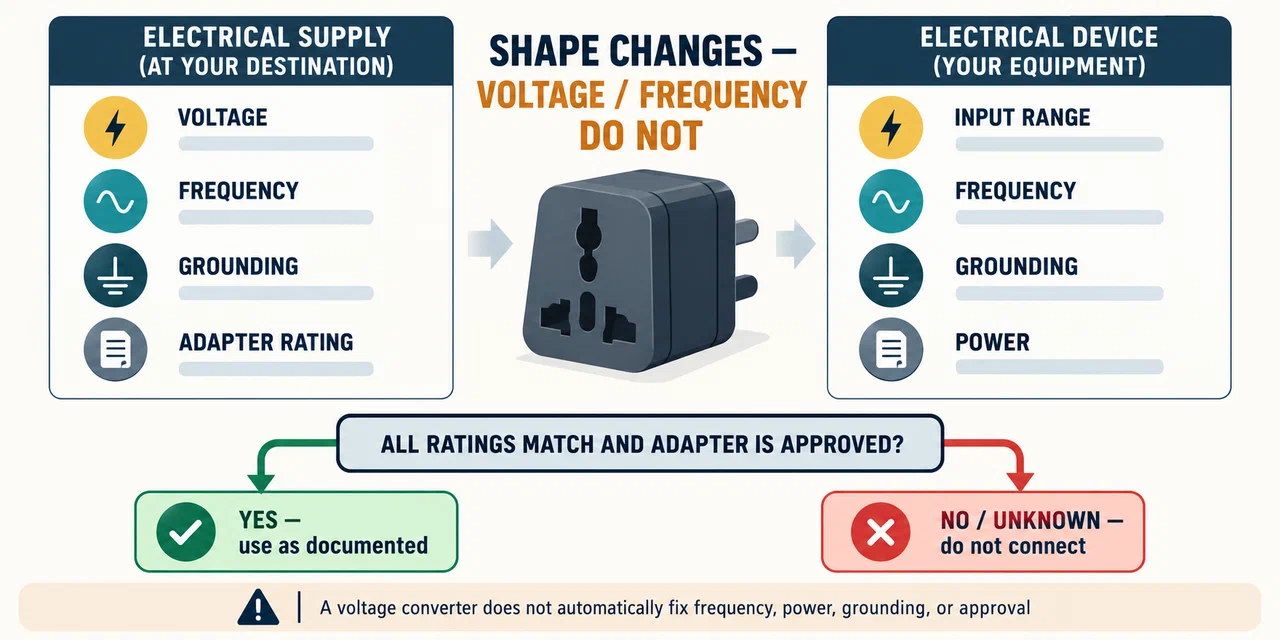
A plug adapter changes mechanical fit; it does not necessarily convert voltage or frequency. First check the appliance power supply and the destination supply. Confirm the full input range printed on the device, the station output’s voltage and frequency, grounding or polarity requirements, and the adapter’s ratings. A dual-voltage charger can accept more than one input range, but that label applies only to that charger.
As regional context, UK domestic supply is described as 230 V at 50 Hz, while Canadian household supply is 60 Hz. A North American appliance or meter rated only for about 115–120 V cannot be made compatible with a 230 V outlet by adding a shape-only adapter. Likewise, a voltage converter does not automatically correct frequency, power rating, grounding, or approval for a particular appliance. Use manufacturer-approved conversion equipment where the appliance documentation requires it.
Measure the correct side of the power station
An AC meter between the station’s AC outlet and an appliance measures energy delivered on that AC path. It does not directly show the battery’s DC input, panel harvest, or losses inside the station. To understand solar charging, use the station’s own input and stored-energy readings where available. For an appliance powered directly from DC, an AC plug meter is not on the relevant path at all.
Before using any meter or adapter, verify that the station model, accessory, and appliance are all approved for the destination region. Keep equipment within its stated ratings and use only accessible receptacles and manufacturer-described connections. If a label is unreadable or supply requirements conflict, stop and ask the manufacturer rather than testing by trial and error.
Key Points
- Use cumulative kWh over a representative cycle to estimate energy use; watts are a momentary reading.
- Confirm the exact meter, AC cable, solar cable, appliance, and station ratings.
- Check DC connector ends, polarity, total cable length, current, and the exact station input path.
- Plug shape does not convert voltage or frequency.
- A plug-in AC meter does not measure DC solar harvest or all station conversion losses.
- Do not infer surge behavior from a steady watt reading or use damaged cables.