BLUETTI AC500 + B300S: Modular Solar Input and Expansion Limits
Understand why AC500 requires a compatible battery module, what the AC500+B300S solar limits mean, and which expansion details to confirm.
The BLUETTI AC500 is a modular inverter system, not a stand-alone battery station. BLUETTI says it must be paired with a compatible B300S or B300 battery. When planning solar, check the AC500’s voltage and panel requirements along with the connected battery module, approved cables, and charging configuration. Do not treat the product family’s maximum solar power as a panel-wiring recipe.
Confirm the system components first
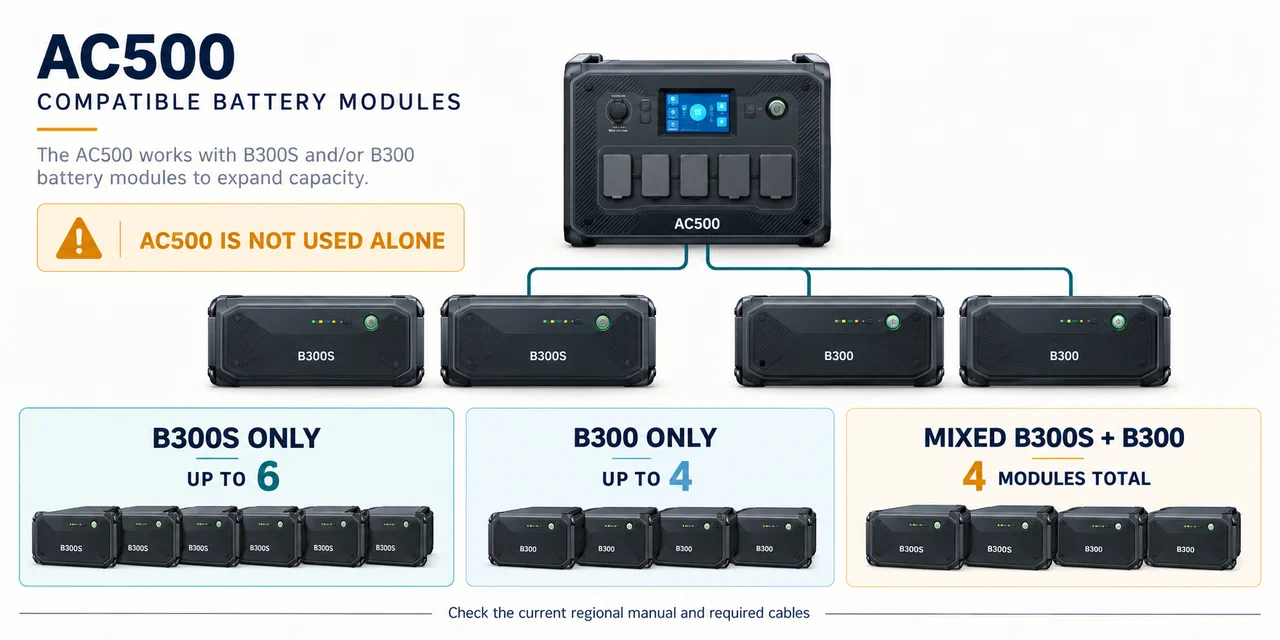
The AC500 product information lists compatibility with up to six B300S batteries or four B300 batteries, and says a mixed B300S/B300 configuration is limited to four modules. It also says the AC500 cannot be used alone. These limits describe the product’s modular connection system; verify the battery model, required connection cable, regional version, and current manual before purchase or setup.
Battery count can change the supported configuration and charging behavior. The product page describes different maximum AC charging and combined AC-plus-solar figures depending on whether the system uses one B300S or two or more. Do not transfer a figure from one battery configuration to another. Capacity expansion adds stored energy; it does not remove the AC500 PV-input limits or automatically make a different battery brand compatible.
Screen the solar source against the AC500
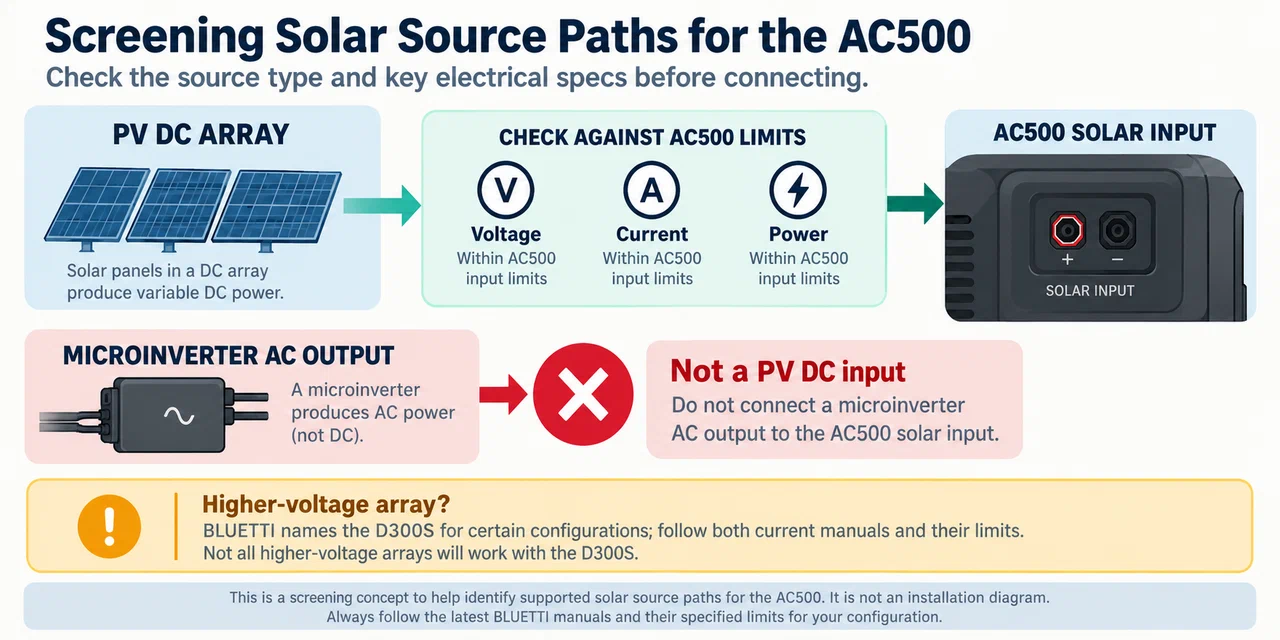
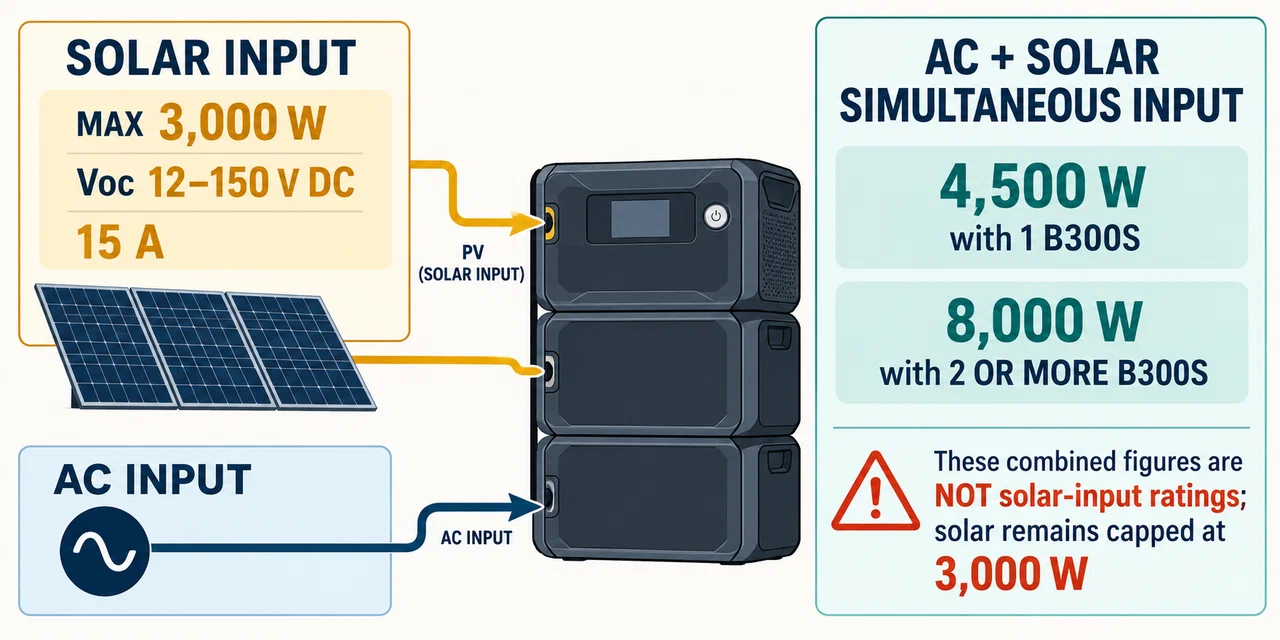
BLUETTI’s US AC500 product and support information state a maximum solar input of 3,000 W and total panel open-circuit voltage in the 12–150 V range; the specifications also list a 15 A current limit. The product FAQ says third-party panels require MC4 connectors and must meet its total-voltage and power conditions. Check the current user manual for how voltage and current limits apply to each input and the selected battery configuration before assembling an array.
Use the exact panel datasheets to calculate series-string cold Voc and parallel-array current. Verify the permitted panel arrangement, connector, polarity, cable, panel count, and station limit independently. The AC500 page’s rooftop-solar FAQ excludes microinverters and repeats the 12–150 V open-circuit condition. A microinverter’s AC output is not a PV DC input and should not be connected to the AC500 solar port.
If a proposed roof string is above the listed voltage range, do not assume a generic adapter or DC-DC converter is acceptable. BLUETTI names its D300S voltage step-down module for certain higher-voltage arrays; any such arrangement must follow the current module and station instructions and stay within their limits. This article does not provide household solar design or installation instructions.
Keep input and expansion questions separate
Solar compatibility answers whether an array can charge the supported system. Expansion compatibility answers which battery modules may connect and how many. A B300S can contribute additional storage within BLUETTI’s documented configurations, but adding batteries does not authorize a higher panel voltage, increase the PV port’s rated current, or imply that all solar sources may be combined. Confirm simultaneous charging and output behavior in the exact manual.
The AC500 product information lists up to 4,500 W combined AC plus solar charging with one B300S and up to 8,000 W with two or more B300S. These are system charging figures for the specified configurations, not standalone solar-input ratings. Solar remains separately capped at 3,000 W. Keep the two values distinct when estimating charge time.
Treat home-backup connections as a separate project
AC500 marketing materials describe home-backup and split-phase configurations. This solar-accessory guide does not explain connecting a power system to a building panel, transfer switch, rooftop array, or utility supply. Do not backfeed a household outlet or improvise fixed wiring. Follow the manufacturer’s installation documents and use a qualified professional for any building electrical work.
Key Points
- AC500 requires a compatible B300S or B300 battery; it is not used alone.
- Solar input has its own 3,000 W and 12–150 V Voc limits; check current and port-specific rules in the manual.
- Battery count changes system configuration but does not raise the solar-input rating.
- Verify panel topology, cold Voc, current, MC4 cable, and exact regional configuration.
- Building integration and household wiring require their own manufacturer instructions and qualified installation.