EcoFlow DELTA Pro Ultra Solar Inputs: Low-PV vs High-PV
Compare the DELTA Pro Ultra’s separate low- and high-voltage PV inputs and screen an array against the correct port limits.
The EcoFlow DELTA Pro Ultra has two distinct photovoltaic (PV) input ranges. The choice between Low-PV and High-PV depends on the planned array’s voltage and the input’s separate current and watt limits. Treat each port as its own compatibility gate, and use the current manual for the exact inverter version and regional configuration before buying cables or connecting panels.
Compare the two input envelopes
| Input | Documented voltage window | Maximum current | Maximum PV power |
|---|---|---|---|
| Low-PV | Above 30 V and below 150 V | 15 A | 1,600 W |
| High-PV | Above 80 V and below 450 V | 15 A | 4,000 W |
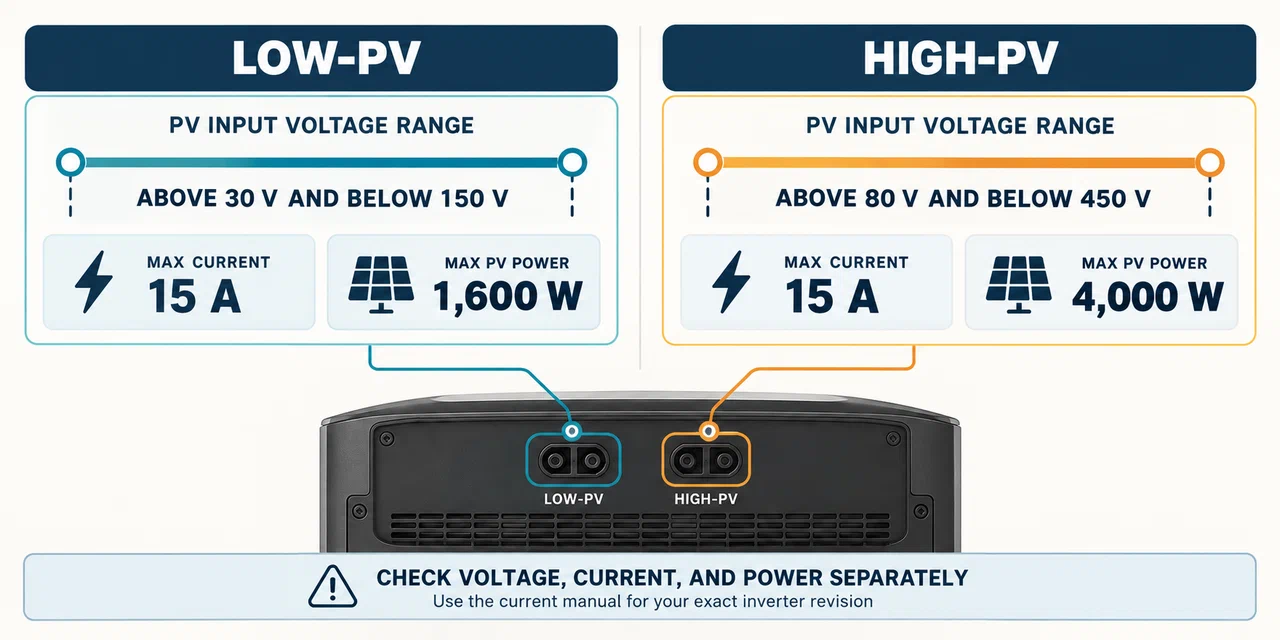
These values are independent limits. The array has to remain within the selected input’s operating voltage range, current limit, and watt ceiling. A watt total under 4,000 W does not make a High-PV string acceptable if its cold open-circuit voltage exceeds 450 V. A Low-PV array should not be routed to the High-PV connector simply to use more panels; the intended input and approved connection method must match.
The DELTA Pro Ultra user guide expresses these voltage ranges with strict inequalities, while current product specifications print the endpoints as 30–150 V and 80–450 V. Do not design at an endpoint. Keep the array inside the user-guide bounds and use the manual supplied for the exact inverter revision if its limits differ.
Choose the port from the array, not from the connector
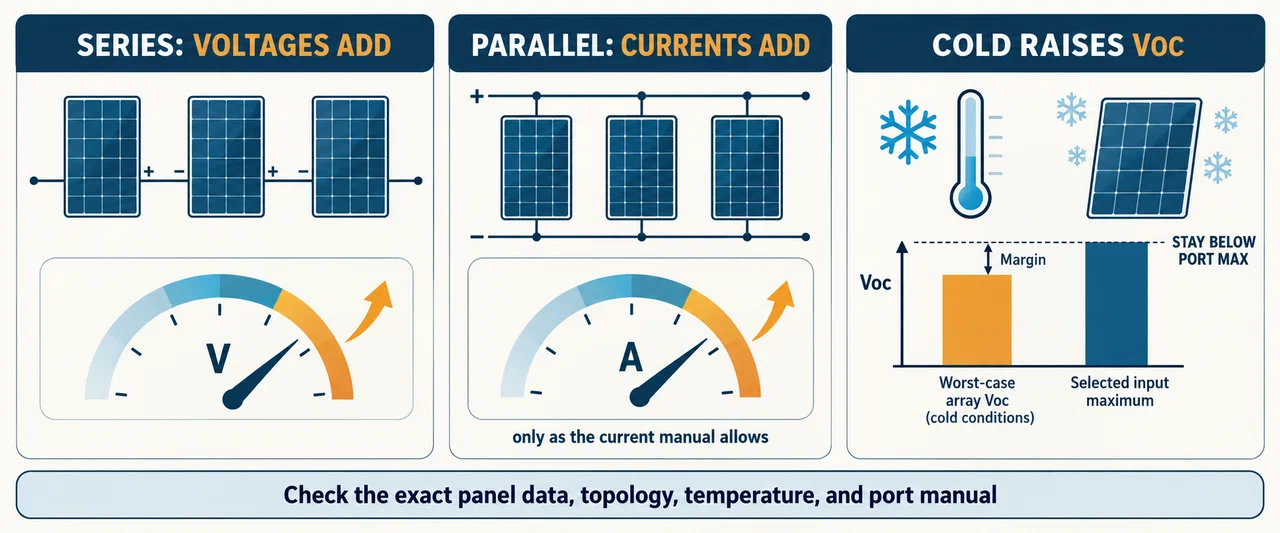
Start by listing each panel’s maximum-power voltage (Vmp), open-circuit voltage (Voc), maximum-power current (Imp), short-circuit current (Isc), and tolerance. Identify any panel-level equipment and follow its instructions. In a series string, the panel voltages add; in a parallel arrangement, current adds. Use the exact series or parallel topology allowed by the panel maker and DELTA Pro Ultra manual.
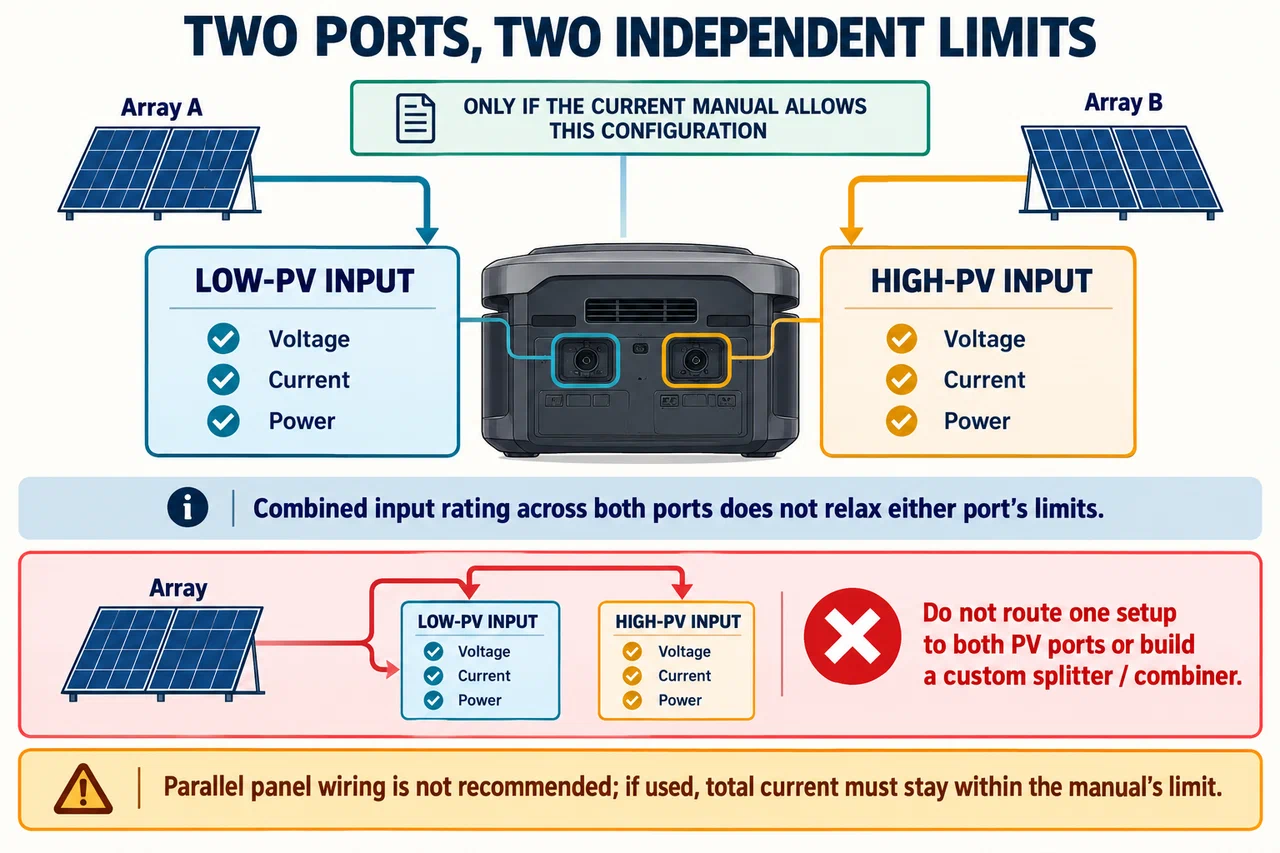
For a Low-PV design, check that array operating voltage is above the input’s 30 V lower boundary and below its 150 V upper boundary under applicable conditions. For High-PV, check the corresponding 80 V and 450 V boundaries. Then check the 15 A current limit and port watt maximum separately. Do not infer that two Low-PV strings may be combined, or that a single array can feed both ports, unless the current manual expressly describes that configuration.
Include temperature and protection behavior
PV open-circuit voltage rises as panel temperature drops. EcoFlow’s documentation warns that cold conditions can increase Voc, but the available DELTA Pro Ultra evidence does not provide a universal panel coefficient. Calculate the array using the exact panel documentation and the expected minimum module temperature. If you cannot establish cold Voc, ask the panel or station maker to review the design.
Protection behavior is not a normal operating specification. Do not design toward an overvoltage trip point or assume that protection will make an out-of-range panel safe. Never connect an array whose worst-case voltage may cross the selected input maximum. If a value is uncertain, leave margin or do not connect the array until the manufacturer confirms it.
Avoid unsupported multi-input arrangements
The manual does not recommend parallel panel wiring and says that, if panels are connected in parallel, the total current must stay within its stated limit. It also says not to connect one panel setup to both PV ports or to multiple DELTA Pro Ultra inverters. EcoFlow’s current product page lists up to 5,600 W of total solar input across the two ports: up to 4,000 W High-PV plus 1,600 W Low-PV. That combined rating does not relax either port’s voltage, current, or power limits. Use separate supported arrays only as the exact manual describes, and do not build a custom splitter or combiner to merge inputs.
High-voltage PV can be hazardous. This page is a specification-screening guide, not instructions for designing or installing a residential array. Use the equipment’s current documentation and manufacturer-approved accessories. Any fixed PV wiring, rooftop work, grounding, rapid shutdown, or building connection should be handled under the applicable equipment instructions and qualified professional requirements.
A practical pre-purchase checklist
- Confirm DELTA Pro Ultra inverter model, revision, region, and manual.
- Choose Low-PV or High-PV from the documented array voltage and port requirements.
- Calculate operating and cold Voc for the exact panels and proposed topology.
- Check current, power, connectors, polarity, cable, and any system-level limit independently.
- Obtain written manufacturer confirmation for any undocumented combination.
For smaller portable arrays, the general solar input sizing guide explains the same checks across model families. For the temperature calculation, see cold-weather panel open-circuit voltage.
Key Points
- DELTA Pro Ultra Low-PV and High-PV are separate inputs with different voltage and watt ranges.
- Each input is limited to 15 A; current, voltage, and power all need independent checks.
- Cold-weather Voc must remain below the selected input maximum with margin.
- Do not parallel inputs, split one array across inputs, or use protection cutoffs as design targets.
- Use model-specific documentation and qualified help for fixed or residential PV work.